Works offline. Your records are stored on your own devices, not on our servers.
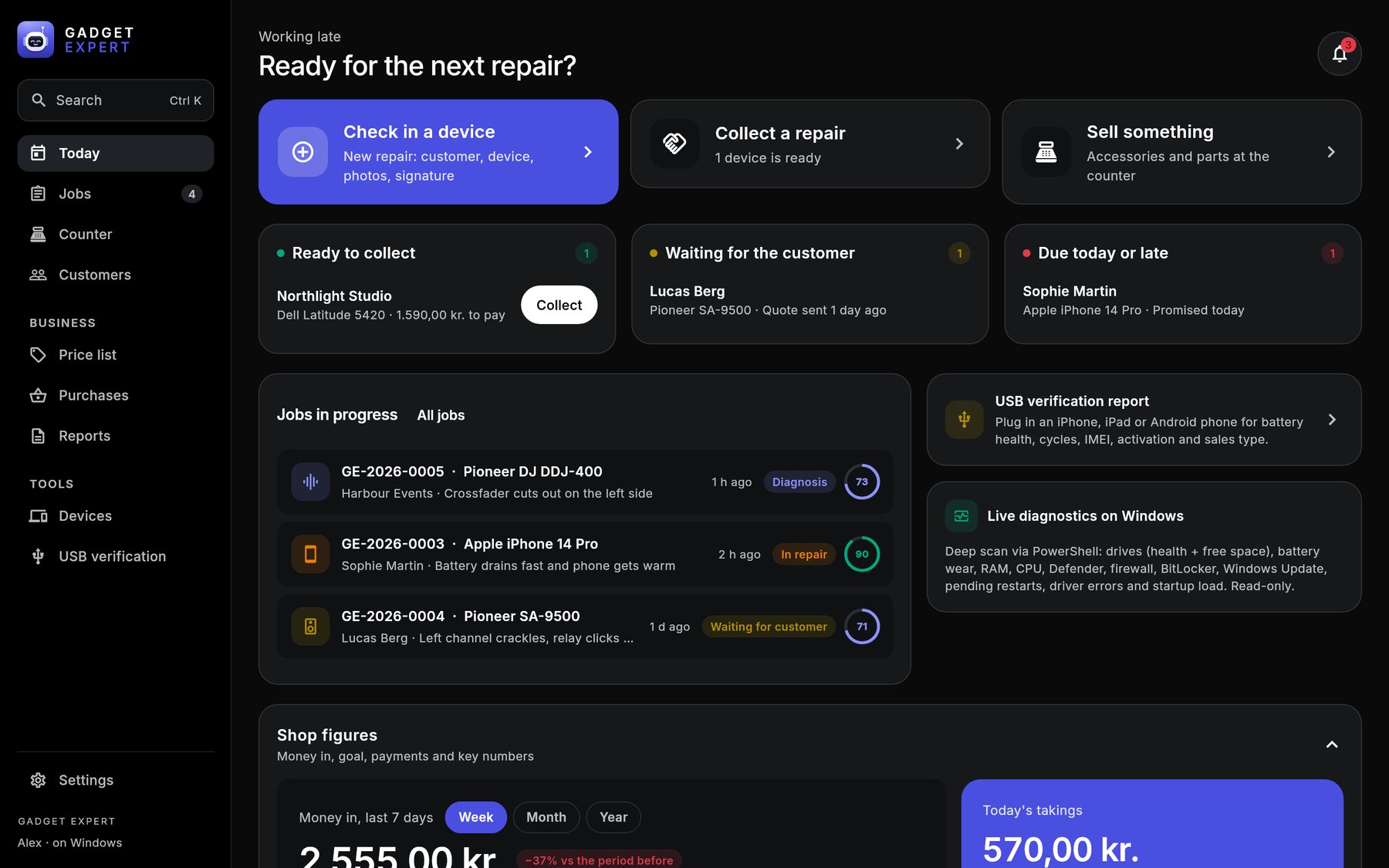
The real app on Windows, with built-in sample data.
Features
From drop-off to pickup, without the paperwork chaos.
One app for the counter and the bench. Each part does one job well and hands the next step to the next screen.
Repair workflow
Check-in on one page, checklists and a health score, repair templates and five clear steps on every job.
Quotes and invoices
Quotes with your logo, numbered invoices, part payments and OIOUBL e-invoices for public customers.
Inventory and reports
Parts and shelf locations, purchase orders, counter sales, VAT, margins and the daily close.
Customer and device records
Every customer, device, serial and past repair in one place. Search all of it from any screen.
How it works
Five steps, the same every time.
Every job shows which step it is on and offers one button for the next one, so new staff know what to do.
1
Register customer and device
Find the customer by name or phone, pick the device from 340+ built-in models, add photos. The customer signs on screen.
2
Record diagnostics and notes
Checklists per device type, a 0–100 health score, a live scan of Windows PCs and Macs, and notes on the job.
3
Quote, then repair
Parts and labour from your price list. Send the quote, record the customer's answer, follow the repair template.
4
Update the repair status
On a list, a board or a schedule. Marking a job ready offers a message to the customer.
5
Invoice and collection
One Collect screen: payment, change, the customer's signature and the invoice or receipt.
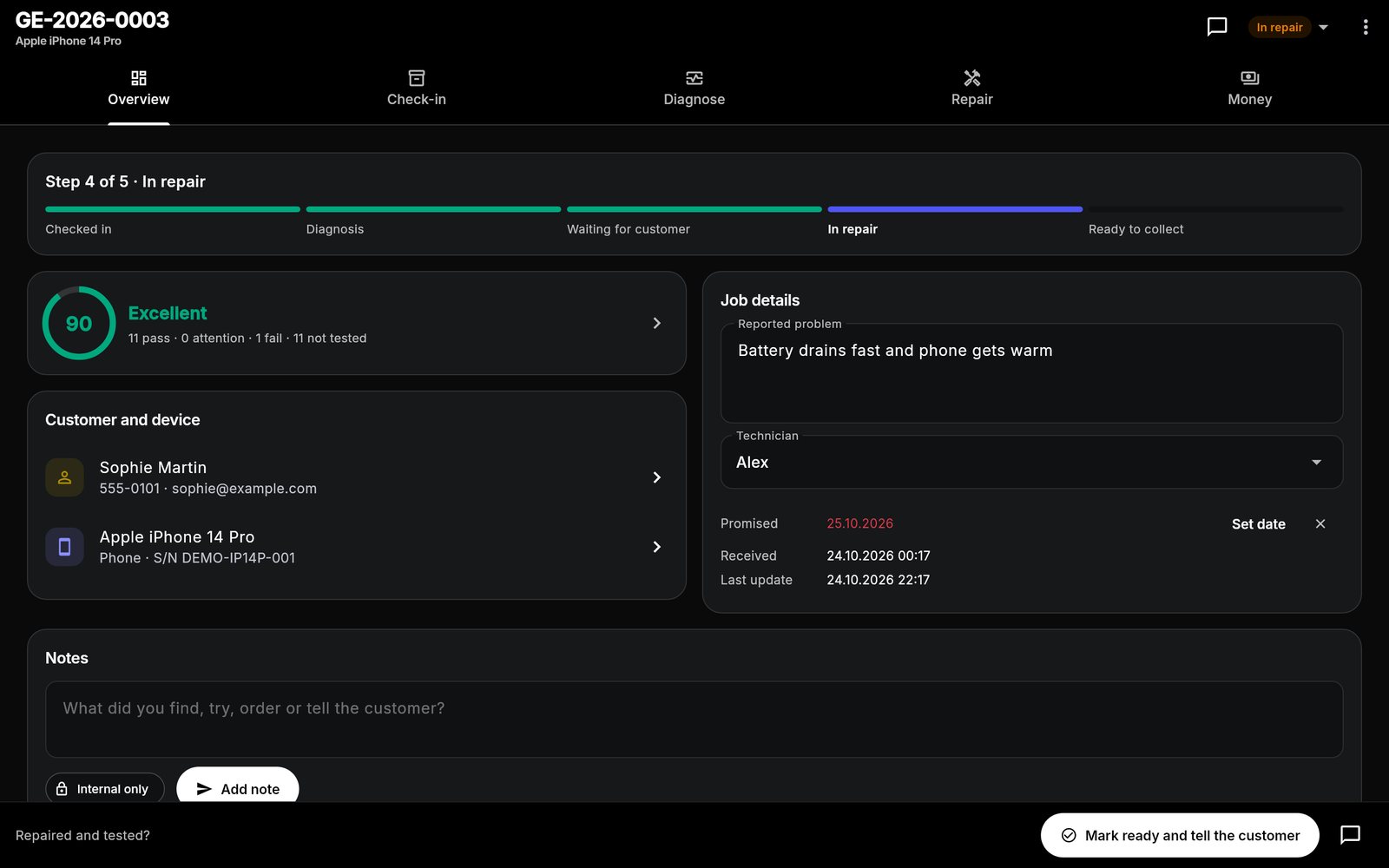
Checked inDiagnosisWaiting for customerIn repairReady to collect
For repair shops
Built for the bench you actually have.
Checklists and repair templates per device type, so a Technics turntable gets a different diagnosis sheet than an iPhone.
Made for Hi-Fi and DJ repair
Amplifiers, turntables, mixers and controllers.
Most repair software stops at phones. Gadget Expert was built in a shop that repairs vintage amplifiers and club gear, and it shows in the details.
Hi-Fi and amplifiers
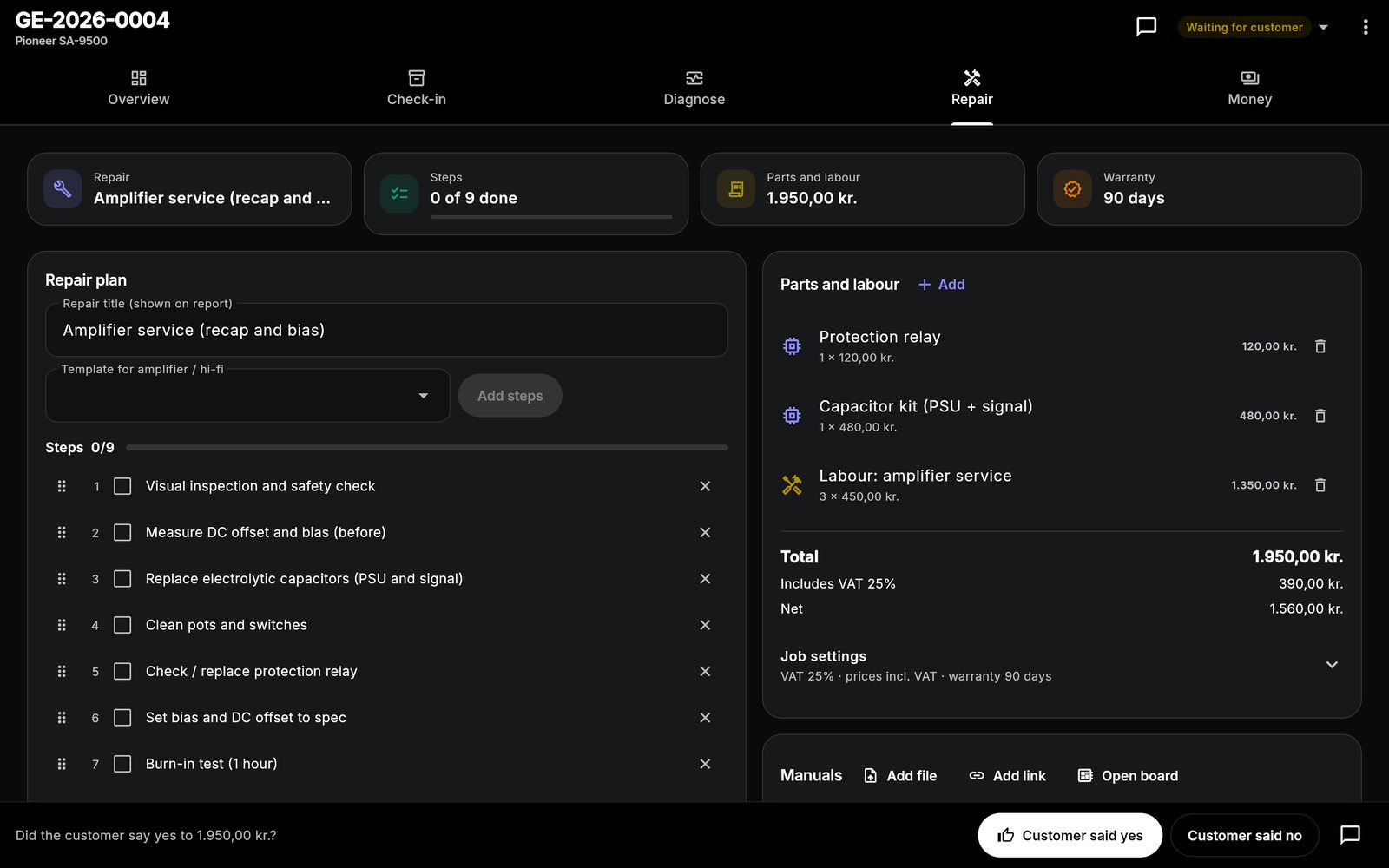
Checklists for protection faults, DC offset and bias, recap and pot-cleaning templates, and a service report the customer keeps.
DJ gear and turntables
Templates for faders, jog wheels and tonearms, parts from your own suppliers, and warranty tracked per device.
An amplifier job on the Repair tab, with sample data.Phones and tablets
Screens, batteries and ports.
A built-in device catalogue, USB verification reports for iPhone and Android, passcodes deleted at hand-over, and QR labels for the device or bag.
Computers and Mac
Diagnose on the bench.
A live hardware scan of the Windows PC or Mac the app runs on: drives, battery wear, memory, security and updates. SSD and reinstall templates included.
Tour
The whole shop in 40 seconds.
Check-in, diagnosis, boardview, invoice and the jobs board, recorded from the real app with sample data.
Inside the app
Real screens, sample data.
Every image here is a screenshot of the app as shipped, filled with the built-in demo data.
Repair jobs
Always clear what happens next.
A job moves through five steps. The bar at the bottom offers the one action that fits: send the quote, record the answer, mark it ready, collect.
Overview, check-in, diagnosis, repair and money on five tabs
The same jobs on a list, a drag-and-drop board or a schedule
Diagnostics and USB verification
Findings the customer can read.
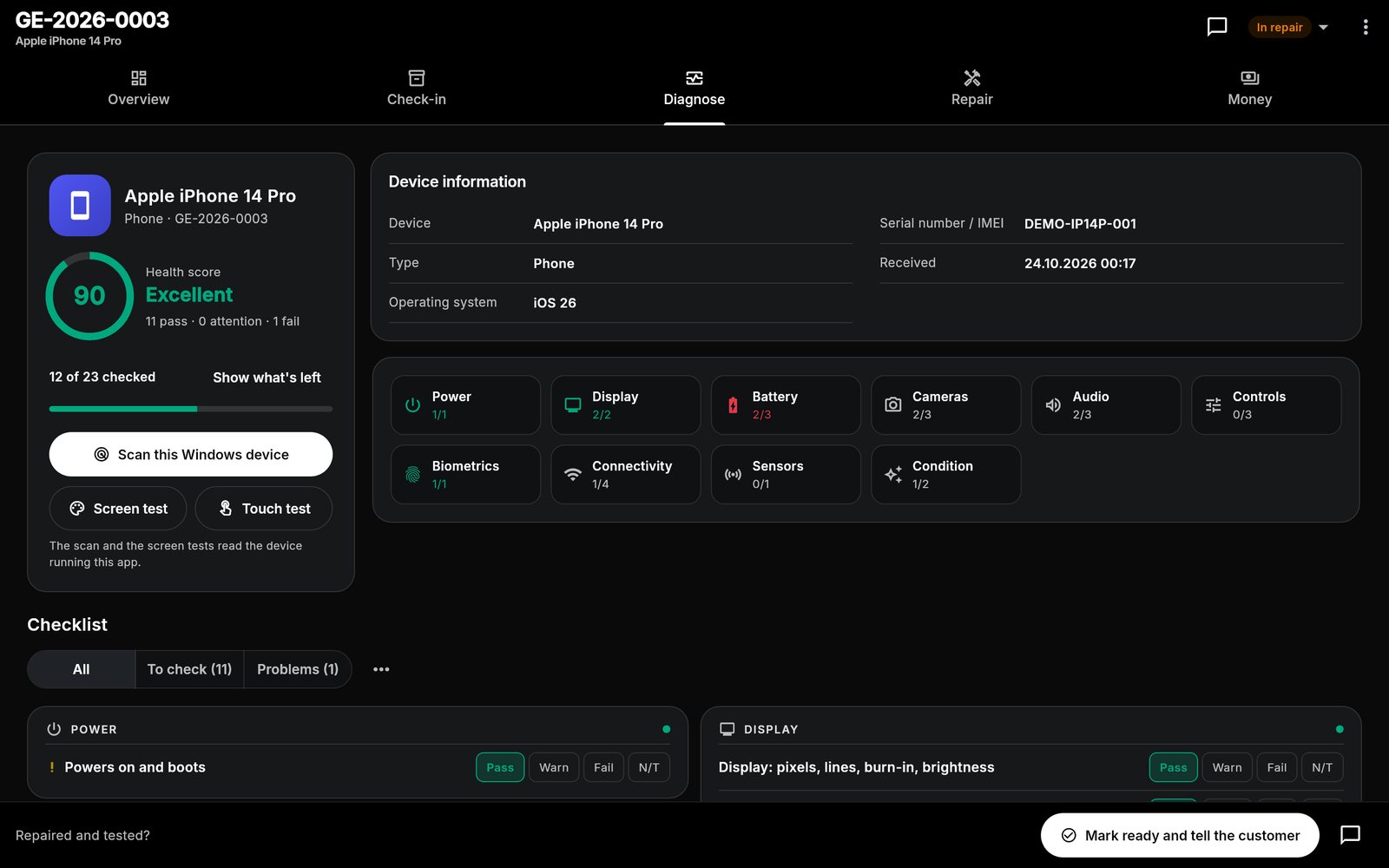
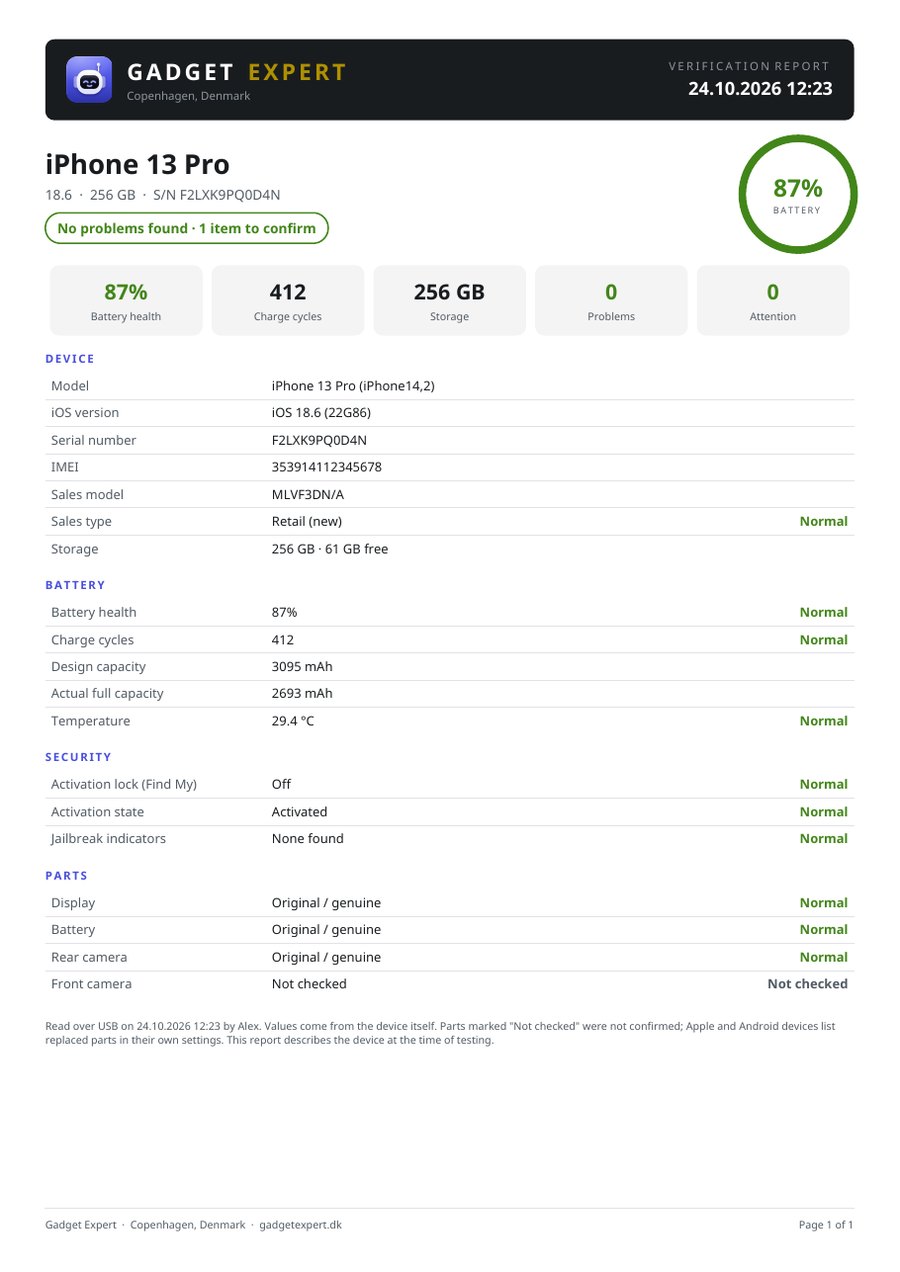
Checklists per device type add up to a health score. Plug an iPhone, iPad or Android phone into the Windows PC or Mac and get a verification report with battery health, cycles and IMEI.
Screen and touch tests, repair templates with steps
USB verification runs on Windows and Mac
Customer records
Every device and every visit.
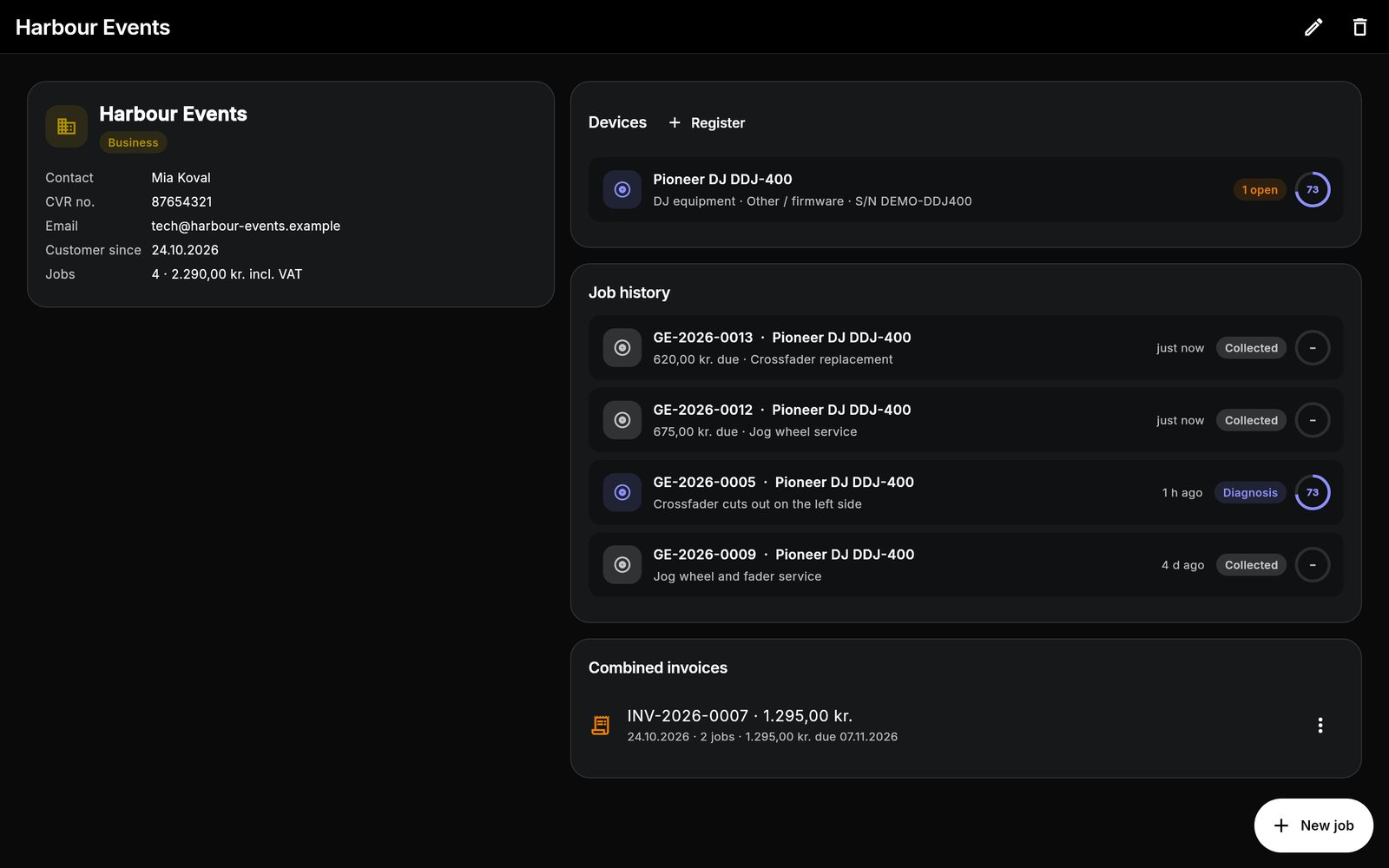
Private and business customers with their devices, serial numbers, job history and combined invoices. Search by name, phone, serial or asset tag from anywhere with Ctrl K or Cmd K.
Import customers from CSV or a spreadsheet
Warranty returns spotted when the same device comes back
Quotes and invoices
Your logo on every document.
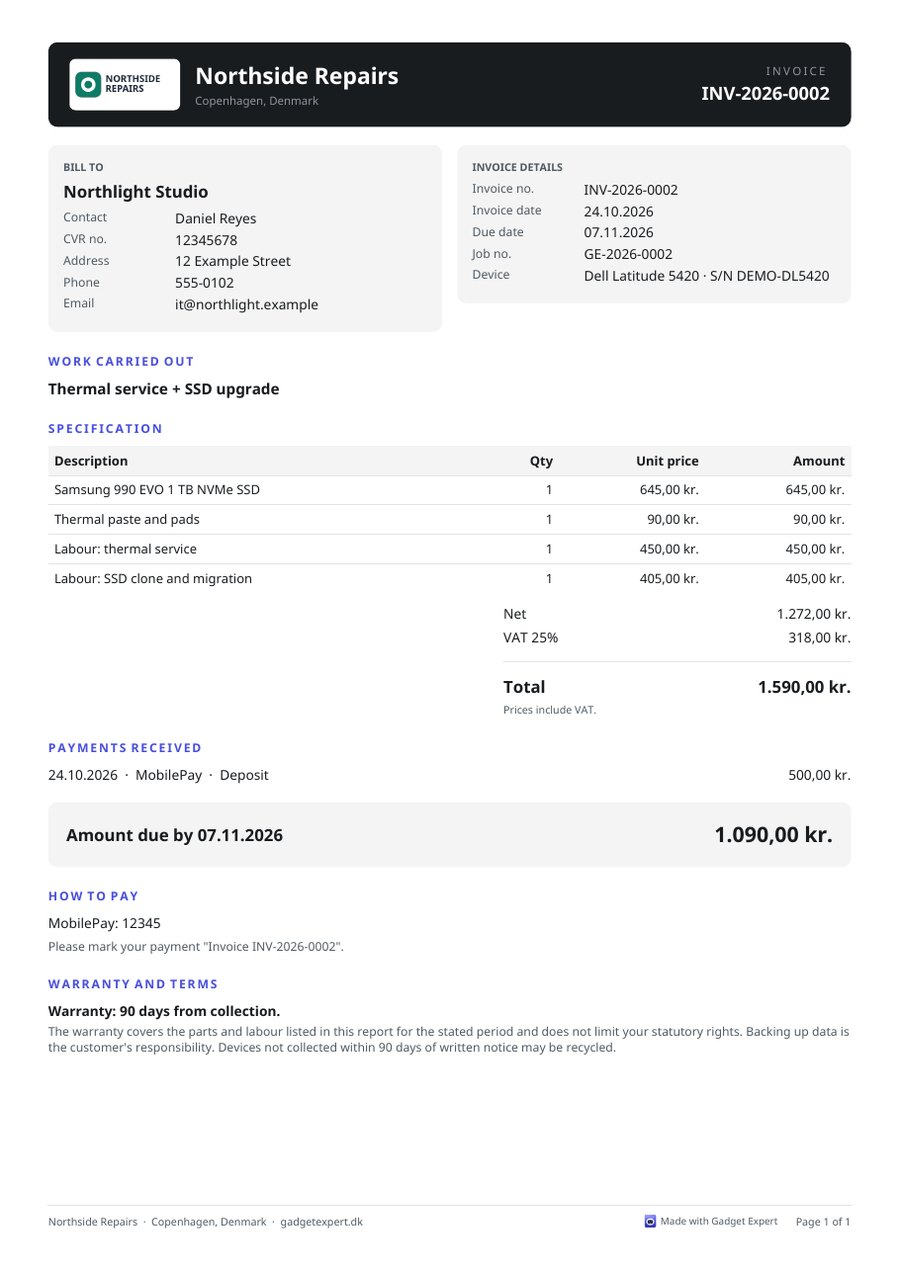
Repair receipts, quotes, invoices and service reports as PDF, in the customer's own language, with payment details and VAT worked out for you.
Part payments and balance due
OIOUBL e-invoices for Danish public customers
An invoice and a USB verification report, made from sample data.
Inventory and reporting
Know what the shop earned.
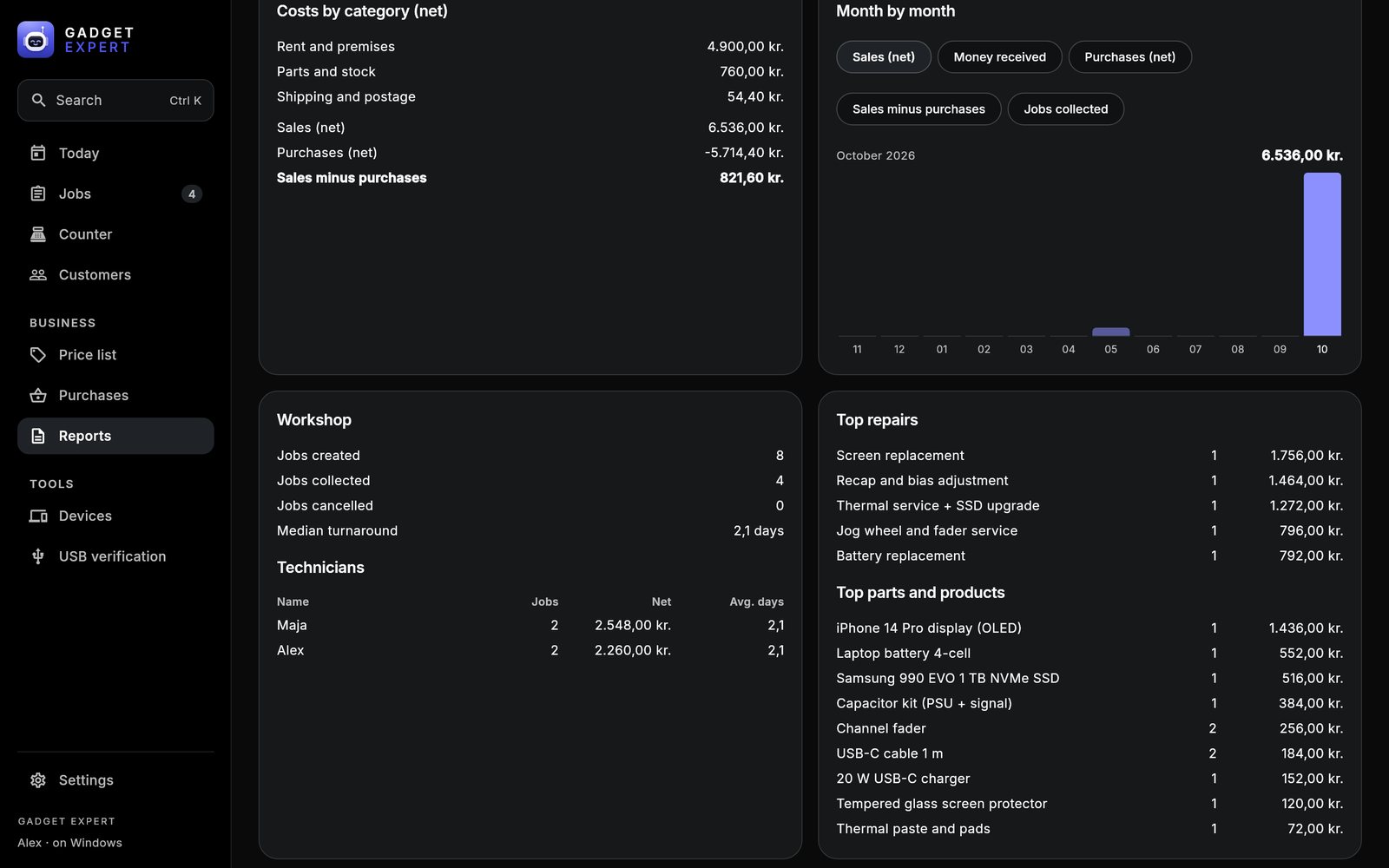
Sales, costs, result and margin month by month. Stock levels, purchase orders and counter sales all feed the same numbers, ready for your accountant as PDF or spreadsheet.
VAT summary and daily close
Stock count and low-stock warnings
Board viewer NEW
Boardview on the bench, readings on the job.
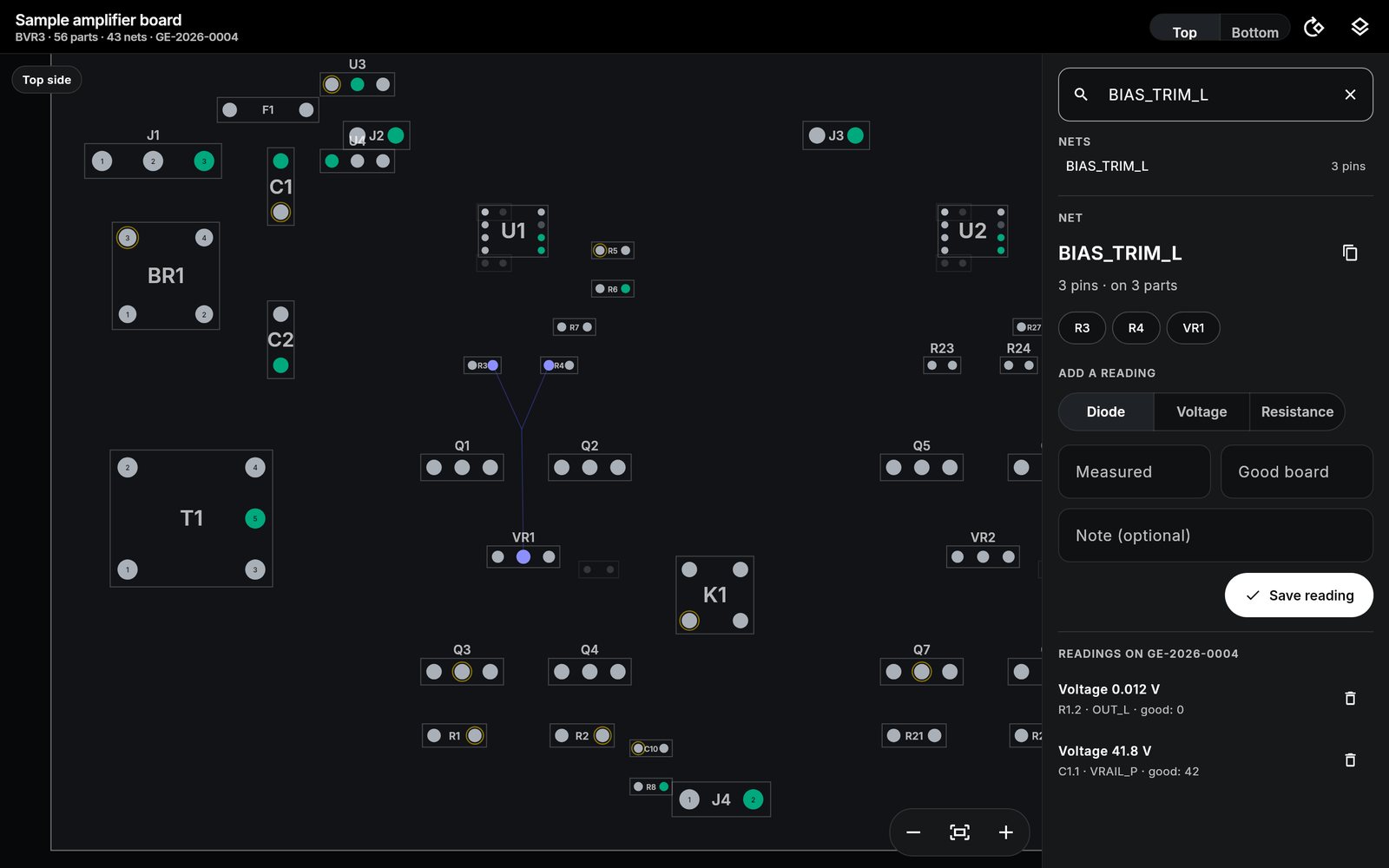
Open the board files you already have and trace a fault without leaving the repair. Every measurement is saved with the job.
Tap a pin, see the netEvery pin on the net lights up, with a line to each one. Ground, unconnected pins and test points have their own colours.
Top, bottom, rotate, searchFlip to the mirrored bottom side, rotate, zoom, and jump to any part or net with keyboard shortcuts on a computer.
Readings saved on the jobDiode, voltage or resistance, next to what a good board reads. Next time the same model comes in, the earlier readings are there.
.brd.bdv.bvr.cadXZZ .pcbASUS .fz
Board files aren't included. Open your own, or try the sample board that comes with the app. Files encrypted by their vendor can't be opened.
The made-up sample amplifier board, with a net selected and two readings on the job.
Manuals NEW
The right manual on every device.
Each device and repair shows where its maker publishes repair information, plus the service manuals and schematics your shop keeps.
Apple, Samsung, Google
One tap to Apple's official repair manuals for iPhone, iPad and Mac and its Self Service Repair store, and to the official Samsung and Google guides on iFixit.
Links to the makers' own pages, always their latest version.
Your own service manuals
Add a PDF, schematic or boardview file once and it shows on every device of that model, or every device of a brand.
Stored with your data and included in backups.
Hi-Fi and DJ gear
For amplifiers, turntables and mixers, a one-tap search for the model's service manual: schematics, parts lists and adjustments.
Save the one you find, and it's there for the next repair.
Offline-first
Your data stays in your shop.
Gadget Expert is a program you install, not a website you log into. It works without internet, and your records are not uploaded to us.
No automatic sync between devices
Each installation keeps its own records. A change on the counter PC does not appear on the bench Mac or a phone. To move data, make a backup on one device and restore it on the other. Restoring replaces that device's data.
What works offlineEverything you do in the shop: check-in, jobs, diagnostics, quotes, invoices, counter sales, reports and printing.
Where records are storedOn the device the app runs on: one data file plus a folder of photos and signatures, in the app's own folder. The app adds no encryption of its own beyond what the operating system provides.
Backup and restoreA backup is one zip file with everything. Keep it on a USB stick, a NAS or a cloud drive you choose. Restore it on any device running the app.
Installing on another deviceA new installation starts with no data. One licence covers every device in your shop; bring your records across with a backup.
What needs internetThe update check (one small file from this site), renewing a subscription licence, the optional AI assistant with your own key, and sending a message, which opens your own SMS, WhatsApp or email app.
Integrations
Works with what your shop already uses.
Gadget Expert doesn't send your data to other services in the background. It works through the printers, files and apps you already have.
Label and receipt printersBrother, Dymo and Zebra labels; 80 and 58 mm thermal receipts; A4. Anything your device can print to.
AccountingSpreadsheet export of customers, jobs, payments, sales, purchases and the price list for your accountant.
OIOUBL e-invoicesInvoice files for Danish public customers through NemHandel. E-invoicing services such as e-conomic, Dinero and Billy can import OIOUBL files.
SMS, WhatsApp and emailMessages to customers open in your own SMS, WhatsApp or email app, already written.
iPhone, iPad and Android over USBVerification reports on Windows and Mac. Windows needs Apple's free Apple Devices app for iPhones.
Repair manualsApple's repair manuals and Self Service Repair, and Samsung and Google guides on iFixit, one tap from the device.
Payment details on invoicesBank transfer, IBAN and MobilePay details printed on the invoice; record card, cash or MobilePay payments.
Spreadsheets inImport customers from a CSV file or cells pasted from Excel, Numbers or Google Sheets.
AI assistant (optional)Ask about your shop's numbers using Anthropic's Claude with your own API key. Off unless you add one.
On the roadmap
Planned
Sync between devicesThe counter PC, the bench Mac and phones sharing the same jobs.
Considering
Automatic SMS and emailCustomer updates sent by the app itself when a repair is ready.
Considering
Repair status pageA link the customer can open to see where their repair is.
Considering
Direct accounting exportInvoices and payments straight into e-conomic or Dinero.
Considering
Card terminals and parts suppliersPayment terminals and ordering parts from within the app.
No dates yet. Which of these would help your shop most? Tell us; it decides what comes first.
Pricing
One price per shop. Unlimited devices and users.
Everything is unlocked for 14 days, no card needed. After that, a licence key keeps you creating new jobs. Your data always stays yours to open, print and export.
Monthly
599 kr./ month
Excluding VAT · about €80 · cancel any time
All features, all platforms, every device in the shop
Secure card payment by Stripe · one invoice for the accountant
Prices exclude VATVAT is added at checkout where it applies. Businesses can enter their VAT number.
Try firstInstall and run real repairs for 14 days with everything unlocked. No account, no card.
Your key straight awayShown on screen after payment and renewed by itself with the subscription.
The licence key is checked on the device, with no account needed. When a licence ends you can still open, finish, print and export existing work; a key is needed to create new jobs. Prefer an invoice? Write to support@gadgetexpert.dk. See the licence terms.
Download · free 14-day trial
Install it on every device in the shop.
Version 1.7. No account to create: install, open, and the trial starts. One licence later covers all of them.
For this device
Windows 10 / 11
Run the installer. For iPhones over USB also install Apple Devices from the Microsoft Store.
Install the app and it starts a 14-day trial with everything unlocked. No account, no card. When it ends you can still open, finish, print and export existing work; a licence key is needed to create new jobs.
How do I install it?
Download the file for your device above. On Windows run the installer, on a Mac open the DMG and drag the app to Applications, on Android open the APK and allow installing from this source. iPhone and iPad are on TestFlight for now: ask for an invitation.
Which operating systems are supported?
Windows 10 and 11, macOS, Android, iPhone and iPad. USB verification of phones runs on Windows and Mac; the camera for photos and scanning is used on phones, tablets and Macs.
Which languages does it speak?
The app, receipts, quotes, invoices, reports and customer messages are available in English, Danish, Swedish, Norwegian, German, Dutch, French, Spanish, Italian and Romanian. Each customer can have their own language for documents and messages.
Does it work offline?
Yes, fully. Internet is only used for the update check, renewing a subscription licence, the optional AI assistant (with your own key) and when you send a message, which opens your own SMS, WhatsApp or email app.
Where is my data stored?
On the device the app runs on: one data file plus a folder of photos and signatures. It is not uploaded to us. The app does not add encryption of its own beyond what the operating system provides, so use a device password and keep backups.
How do backups and restore work?
Settings → Backup and data writes one zip file with everything to Documents/Gadget Expert/Backups (on phones and tablets it also opens the share sheet). Restore picks a backup file from anywhere and replaces the data on that device.
Can I use it on several devices? Do they sync?
The licence covers every device in your shop. Each device keeps its own data and there is no automatic synchronisation: a change on one device does not appear on another. You move data with a backup.
How is the licence activated?
After payment the key is shown on screen (and emailed). Paste it into Settings → Your shop → Licence on each device. The key is checked on the device itself; when the subscription renews, the app picks up the renewed key by itself the next time it is online.
How do updates and support work?
The app shows a banner when a new version is available here; you download and install it like the first time. Updates are included in the licence. Support is by email at support@gadgetexpert.dk, and the help centre has a getting-started guide.
Which boardview files can it open?
Test_Link and BRDOUT .brd, Honhan .bdv, BVR .bvr (formats 1 and 3) and .cad. Files encrypted by their vendor, XZZ .pcb and ASUS .fz, can't be opened; use the vendor's own software for those.
Are schematics and board files included?
No. The app links to the manuals makers publish (Apple, and Samsung and Google through iFixit) and opens the files you have. A made-up sample board comes with the app so you can try the viewer.
Which label and receipt printers work?
Any printer the device can print to. Labels: Brother 62×29 mm, Dymo 89×36 mm, Zebra and other sizes. Receipts: 80 and 58 mm thermal printers, or A4.
Can I import my customers?
Yes, from a CSV file or cells pasted from Excel, Numbers or Google Sheets. Columns are matched automatically and duplicates are skipped.
Spend less time managing paperwork. Focus on the repair.
Bring your repair workflow into one organized workspace with Gadget Expert.